If you run a business on Squarespace, you are sitting on one of the easiest revenue opportunities available to you — gift certificates. Whether you run a boutique, a photography studio, a restaurant, or an online service, selling gift certificates can bring in money instantly, attract new customers, and build loyalty with existing ones.
This post covers everything you need to know about setting up a gift certificate on Squarespace — from the technical steps to the marketing strategies that actually move the needle.
Table of Contents
- What Is a Gift Certificate on Squarespace?
- Why Sell Squarespace Gift Certificates?
- Squarespace Gift Certificate vs. Gift Card: What’s the Difference?
- How to Set Up a Gift Certificate on Squarespace
- How to Customize Your Squarespace Gift Certificate
- Best Practices for Selling Gift Certificates on Squarespace
- Marketing Your Squarespace Gift Certificates
- Case Studies: Businesses Winning with Gift Certificates
- Common Mistakes to Avoid
- FAQs About Gift Certificates on Squarespace
What Is a Gift Certificate on Squarespace? {#what-is}
A gift certificate on Squarespace is a digital or physical voucher that customers can purchase from your Squarespace store and give to someone else as a present. The recipient then redeems the certificate for products or services you offer. Squarespace has built-in functionality that makes it relatively straightforward to offer gift certificates directly through your website — no complicated third-party integrations needed (though options exist for that too).
Squarespace refers to these as gift cards within its platform, but many businesses market them externally as “gift certificates” because the term feels more premium and personal, particularly for service-based businesses like spas, photographers, coaches, and restaurants.
“Gift cards are one of the most requested items during the holiday season. Over $28 billion in gift cards go unused every year in the United States alone — meaning businesses hold that balance as pure profit.” — CEB Global Gift Card Study
Understanding what a gift certificate is on Squarespace is the first step. Knowing why you should sell them is what makes the decision obvious.
Why Sell Squarespace Gift Certificates? {#why-sell}
There are dozens of ways to grow your business, but very few of them generate immediate cash flow the way gift certificates do. When a customer buys a gift certificate on Squarespace, you receive payment right away — even before the service or product is ever delivered.
Suggested read: How BigCommerce Gift Certificates Work — And How to Use Them to Boost Your Store Revenue
Here are the top reasons to sell gift certificates through your Squarespace store:
1. Immediate Revenue, Deferred Delivery
You get paid the moment someone buys a gift certificate. The actual work (or product shipment) happens later, sometimes weeks or months down the line. This is a powerful cash flow tool, especially for small businesses.
2. New Customer Acquisition
When a gift certificate is given as a present, the recipient is often someone who has never heard of your business. Gift certificates are a warm, built-in referral channel. The giver is essentially vouching for your brand.
3. Higher Average Transaction Values
Studies consistently show that gift card recipients tend to spend more than the gift card’s face value. According to a report by First Data, 72% of gift card users spend more than the value of the card. Setting up gift certificates on Squarespace taps directly into this behavior.
4. Brand Awareness
Every time someone buys a Squarespace gift certificate from your store and gives it away, your brand lands in front of a new set of eyes. It’s organic, word-of-mouth marketing with a financial transaction attached.
5. Holiday and Seasonal Revenue Spikes
Gift certificates are perennially popular during:
- Christmas and Hanukkah
- Valentine’s Day
- Mother’s Day and Father’s Day
- Birthdays and anniversaries
- Graduation season
Having a Squarespace gift certificate option ready during these peaks can dramatically increase your seasonal revenue.
Squarespace Gift Certificate vs. Gift Card: What’s the Difference? {#difference}
Many people use these terms interchangeably, but there are subtle differences worth understanding — especially when setting up on Squarespace.
Suggested read: How Avantor Certificate of Analysis Keeps Your Lab Work Reliable and Trustworthy
| Feature | Gift Certificate | Gift Card |
|---|---|---|
| Format | Usually paper or PDF | Digital or plastic card |
| Redeemability | Often tied to a specific service | Can be used for any product/service |
| Tracking | Manual or code-based | Automatically tracked |
| Feel | More personal and premium | Practical and convenient |
| Common Use | Service businesses (spas, photography) | Retail and e-commerce stores |
On Squarespace, the platform uses the term “gift cards,” which function like digital gift certificates. You can customize the amount, design, and delivery method. For businesses that want the look and feel of a traditional gift certificate, you can combine Squarespace’s native gift card tool with a PDF template to send alongside it.
For this post, we’ll use both terms — gift certificate and gift card — since they function the same way within the Squarespace ecosystem.
How to Set Up a Gift Certificate on Squarespace {#how-to-setup}
Setting up a gift certificate on Squarespace is a built-in feature for Squarespace Commerce plans. Here is a step-by-step walkthrough.
Step 1: Upgrade to a Squarespace Commerce Plan
Gift cards (gift certificates) are only available on Squarespace Commerce Basic or Commerce Advanced plans. If you are on a personal or business plan, you will need to upgrade.
- Commerce Basic — Includes gift card selling, no transaction fees
- Commerce Advanced — Includes everything in Basic plus abandoned cart recovery, advanced shipping, and more
Step 2: Navigate to Gift Cards in Your Dashboard
- Log in to your Squarespace account
- Open your website’s backend dashboard
- Go to Commerce in the left-hand sidebar
- Click on Gift Cards
Step 3: Enable Gift Cards
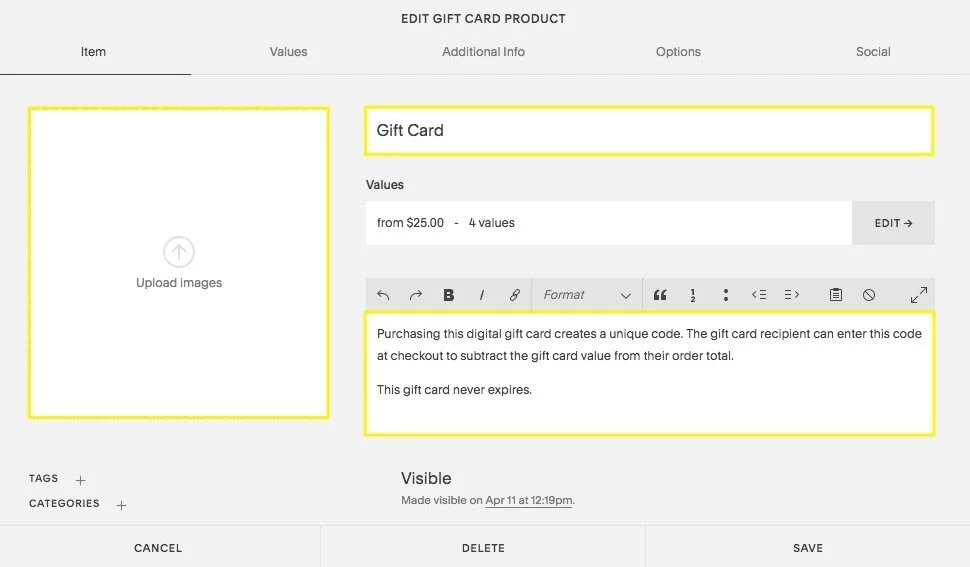
Toggle the Gift Cards feature to “On.” Squarespace will automatically create a gift card product page on your store. You can find it listed in your Products section.
Step 4: Set Gift Certificate Amounts
You can offer gift certificates in:
- Fixed amounts (e.g., $25, $50, $100, $200)
- Custom amounts where the buyer enters what they want to give
Pro tip: Offering three to four fixed denominations plus a custom option gives customers the best experience. The most popular denominations across e-commerce stores are $25, $50, and $100.
Step 5: Customize the Gift Card Product Page
Edit the product page just like any other Squarespace product:
Suggested read: Keyfactor Certificate Management: How It Works and Why Enterprises Need It Now
- Add a compelling product title (e.g., “Gift Certificate – [Your Business Name]”)
- Write a description that tells the recipient exactly what they can use it for
- Upload an attractive cover image or branded graphic
- Set SEO settings with your target keyword
Step 6: Configure Delivery Settings
Squarespace delivers gift cards digitally via email by default. The buyer enters the recipient’s email address at checkout. The email includes a unique code that the recipient can apply at checkout.
Step 7: Publish and Test
Before going live:
- Do a test purchase using a secondary email address
- Confirm the gift card email arrives and the code works at checkout
- Make sure the product page looks good on mobile and desktop
Source: For official documentation on setting up gift cards, visit Squarespace’s Help Center on Gift Cards.
How to Customize Your Squarespace Gift Certificate {#customize}
Once the basic setup is done, you want your gift certificate to look and feel like an extension of your brand — not a generic product. Here’s how to make your Squarespace gift certificate stand out.
Design Your Gift Card Image
The default Squarespace gift card image is plain. Replace it with a branded graphic using tools like:
- Canva (free, easy templates)
- Adobe Express
- Figma (for more advanced users)
Your gift certificate image should include:
- Your logo
- Your brand colors
- A short tagline (e.g., “Give the gift of great skin”)
- The phrase “Gift Certificate” prominently displayed
Write a Compelling Product Description
Your gift certificate description should answer three questions:
- What can the recipient use it for?
- How do they redeem it?
- Does it expire?
Here’s an example of a strong description:
Suggested read: Access Certification Process: What It Is, How It Works, and Why It Matters for Your Organization
“Give someone special the gift of a beautiful experience. This [Business Name] gift certificate can be redeemed for any of our services — from massage therapy to facial treatments. Simply use the code at checkout. Gift certificates do not expire.”
Add an Expiration Policy
Squarespace does not automatically set expiry on gift cards. If you want them to expire, note it clearly in your product description and Terms & Conditions. Note: Many U.S. states have laws that restrict gift card expiration dates — check your local regulations before setting one.
Best Practices for Selling Gift Certificates on Squarespace {#best-practices}
Selling a gift certificate on Squarespace is one thing. Selling it well is another. Here are the best practices followed by top-performing Squarespace stores.
✅ Feature Gift Certificates Prominently in Navigation
Don’t bury your gift certificate page three clicks deep. Add it to your:
- Main navigation menu
- Homepage banner or hero section
- Footer links
A dedicated “Gift Cards” or “Gift Certificates” link in your nav can increase visibility dramatically — especially during the holiday shopping season.
✅ Offer Multiple Price Points
Give buyers options. People don’t like guessing what to spend. A clear range helps:
| Price Point | Target Buyer |
|---|---|
| $25 | Casual acquaintance, coworker |
| $50 | Friend or family member |
| $100 | Close friend, partner |
| $200+ | Premium gifter, spouse, parent |
| Custom | Any budget |
✅ Use Urgency During Key Shopping Periods
Create limited-time offers around your gift certificates:
- “Order by December 20th for guaranteed holiday delivery”
- “Buy a $100 gift certificate, get a $10 bonus credit”
- “Valentine’s Day Special: 10% off all gift certificates”
✅ Enable Guest Checkout
Some gift buyers may not want to create an account. Make sure guest checkout is enabled in your Squarespace Commerce settings so the purchasing experience is as frictionless as possible.
Suggested read: MBA Certificate vs MBA Degree: Which One Is Actually Worth Your Time and Money?
✅ Promote on Your Thank You Page
After any purchase is completed, use your Squarespace Order Confirmation page to suggest gift certificates. You can add a short note like: “Know someone who’d love this? Send them a gift certificate.”
Marketing Your Squarespace Gift Certificates {#marketing}
Having the feature set up is only half the battle. You need to actively market your Squarespace gift certificates to generate consistent sales.
Email Marketing
Email is the highest-ROI marketing channel for most small businesses. Here’s how to use it for gift certificates:
- Seasonal campaigns: Send a dedicated gift certificate email in late November, early December, before Valentine’s Day, and before Mother’s Day
- Post-purchase upsell: After a customer buys from you, send a follow-up suggesting a gift certificate for a friend or family member
- VIP early access: Tell your loyal subscribers they can buy gift certificates before you announce them publicly
Social Media Promotion
Use your social channels to actively promote your gift certificates:
- Post lifestyle images showing someone receiving or using your gift certificate
- Create Instagram Stories with a direct link to your gift card product page
- Run a Facebook or Instagram ad targeting local customers (especially for service businesses)
- Use the caption to clearly state what the certificate covers and how to purchase
SEO for Your Gift Certificate Page
Your gift card product page can rank in Google if you optimize it. Here’s how:
- Title tag: “Gift Certificates – [Business Name] | [City]”
- Meta description: Mention the gift certificate, what it covers, and a call to action
- H1 heading: Use a variation of “gift certificate squarespace” or “[Business Name] Gift Certificates”
- Body content: Describe what recipients can use the certificate for, include FAQ content
- Alt text on the image: “Gift certificate for [Business Name] available on Squarespace”
Partner with Local Businesses
If you have a brick-and-mortar presence, partner with complementary local businesses to cross-promote gift certificates. A florist and a restaurant can promote each other’s gift certificates for Valentine’s Day. A gym and a juice bar can bundle promotions.
Case Studies: Businesses Winning with Gift Certificates {#case-studies}
Case Study 1: Boutique Day Spa – Holiday Revenue Surge
A small day spa in Austin, Texas added Squarespace gift certificates to their store in November 2022. They promoted them via email and Instagram with a simple “Give the gift of relaxation” message. Results:
Suggested read: What Is a Workers Comp Insurance Certificate and Why Does Your Business Actually Need One?
- Gift certificate sales increased by 340% compared to the prior year
- 38% of gift certificate recipients were first-time clients
- Average redemption spend exceeded certificate value by $47
The spa owner noted: “We made more in December from gift certificates alone than we had from any other single product in our history.”
Case Study 2: Online Photography Course Creator
A Squarespace-based photography educator added gift certificates after getting requests from parents wanting to give their teenagers a photography course for Christmas. By adding a Custom Amount gift certificate and promoting it in a YouTube video, they:
- Sold $14,200 in gift certificates in one quarter
- Gained 110 new course students via redemptions
- Reduced their reliance on paid ads by 22% due to organic gift-driven referrals
Case Study 3: Independent Bookstore
A Brooklyn-based independent bookstore set up Squarespace gift certificates after the pandemic forced them online. They ran a “Support Local” campaign that centered gift certificates as a way to keep the store alive.
- Sold over $60,000 in gift certificates in three months
- Saw a 15% increase in average order value from gift card redeemers
- Built an email list of 800+ new subscribers through the campaign
Common Mistakes to Avoid {#mistakes}
Even with the best intentions, many businesses make avoidable errors when setting up or selling gift certificates on Squarespace. Here are the most common ones:
❌ Not Promoting the Gift Certificate Page
Setting up the page and hoping people find it is not a strategy. You must actively promote it through email, social, and your website navigation.
❌ Using Low-Quality or Generic Images
Your gift certificate image is often the first thing a buyer sees. A blurry, unbranded, or generic image reduces trust and conversion rates.
❌ Forgetting Mobile Optimization
More than 60% of e-commerce browsing happens on mobile. Check that your gift certificate product page looks great on a smartphone, not just a desktop.
❌ Unclear Redemption Instructions
If the recipient doesn’t know how to use the code, they won’t. Make your redemption instructions simple, clear, and included in both the product description and the gift card email.
Suggested read: What Is a Digital Certificate Manager and Why Does Your Business Need One?
❌ Ignoring Legal Requirements
Some states and countries have consumer protection laws around gift certificates. Common rules include:
- No expiry dates (or minimum 5-year expiry) in many U.S. states
- No dormancy fees in certain jurisdictions
- Disclosure requirements for unused balances
Always consult a legal professional to ensure your gift certificate policy is compliant.
❌ Skipping the Test Purchase
Always test before launch. A broken redemption code is a quick way to lose trust and have to manually issue refunds or replacements.
Ready to Start Selling? Set Up Your Gift Certificate on Squarespace Today {#cta}
If you haven’t already added a gift certificate to your Squarespace store, there’s no better time than right now. The setup takes less than an hour, the ROI is immediate, and the benefits compound over time as your gift certificates reach new audiences you’d never have found through traditional marketing.
Here’s your action plan:
- ✅ Log in to Squarespace and navigate to Commerce > Gift Cards
- ✅ Enable the feature and set your denominations
- ✅ Design a branded gift certificate image with Canva
- ✅ Write a clear, compelling product description
- ✅ Add the gift card page to your main navigation
- ✅ Send an email to your list announcing it
- ✅ Post about it on social media with a direct link
👉 Set up your Squarespace gift certificate now and start turning every happy customer into a referral engine for your business.
FAQs About Gift Certificates on Squarespace {#faqs}
What is a gift certificate on Squarespace?
A gift certificate on Squarespace is a digital voucher (called a gift card in Squarespace’s interface) that customers can purchase and send to others via email. The recipient receives a unique code they can apply at checkout in your store.
Can I sell a gift certificate on Squarespace without a Commerce plan?
No. Squarespace gift certificates (gift cards) require a Commerce Basic or Commerce Advanced plan. They are not available on the Personal or Business plans.
Do Squarespace gift certificates expire?
By default, Squarespace gift cards do not have an expiration date. If you choose to add one, you must note it in your product description and Terms & Conditions — and ensure it complies with your local consumer protection laws.
Can customers use a Squarespace gift certificate for any product?
Yes. Once a Squarespace gift certificate code is issued, the recipient can apply it at checkout for any product or service available in your store, as long as the total falls within (or exceeds) the certificate’s value.
How does Squarespace deliver gift certificates to recipients?
Squarespace delivers gift certificates via email. During checkout, the buyer enters the recipient’s email address, and the gift card code is automatically sent to that email after the purchase is confirmed.
Can I offer custom amounts on my Squarespace gift certificate?
Yes. Squarespace allows you to offer both fixed denominations (e.g., $25, $50, $100) and a custom amount option where the buyer can enter any value they choose.
How do I track Squarespace gift certificate sales and redemptions?
You can track gift certificate sales and redemptions in your Squarespace Commerce dashboard under Gift Cards. It shows total sold, total redeemed, and outstanding balances.
Is there a limit to how many gift certificates I can sell on Squarespace?
No. There is no cap on the number of gift certificates you can sell through Squarespace. You can sell as many as your customers want to buy.
Can I use third-party tools to sell gift certificates on Squarespace?
Yes. If you need more advanced features than Squarespace’s native gift card tool provides, you can integrate third-party solutions like Giftup, Gift Up!, or ReCharge via Squarespace’s extensions marketplace or custom code blocks.
Where can I learn more about setting up Squarespace gift certificates?
You can find the official documentation on Squarespace’s Help Center — Gift Cards page for up-to-date instructions and troubleshooting.
Final Thoughts on Gift Certificates and Squarespace
Selling a gift certificate on Squarespace is one of the lowest-effort, highest-return additions you can make to your online store. It takes a short time to set up, costs nothing beyond your existing Commerce plan, and has the potential to bring in thousands of dollars in revenue — especially around major gift-giving seasons.
The key is not just enabling the feature, but treating your Squarespace gift certificates as a real product line that deserves its own marketing strategy, its own beautiful design, and its own place in your customer journey.
Start small if you need to. Set up one price point, create a simple branded image, and send one email to your list. Measure what happens. Then build from there.
Your next great customer might be someone who’s never heard of you — until a friend hands them your gift certificate.
Citation: Squarespace. (2024). “Gift Cards.” Squarespace Help Center. Retrieved from https://support.squarespace.com/hc/en-us/articles/206541417-Gift-cards
First Data. (2023). “Gift Card Gauge Report.” Retrieved from https://www.firstdata.com/en_us/all-features/gift-solutions.html
CEB Global. (2022). “Gift Card Industry Study.” CEB Research Division.